Linear Referencing and GeoSpatial Technology
The main impetus to merge linear referencing with geospatial technology can be summed up simply: it’s often desirable to view location data on a map. It also opens up a lot of other analysis capabilities, such as summing up data within an area feature (for example, the miles of road that require maintenance within a given jurisdiction) or finding data within a proximity of linearly referenced data (for example, finding residences near a construction project). One goal is to increase the value of your data by turning it into business-critical, decision-support information.

The preceding diagram shows a portion of road on the left and its geospatial representation on the right. The road has mile posts that indicate cumulative linear measures along the road. It also has a road name, Highway 6 in this example. A section of fencing along the road is also shown in both the left and right views. Based on the mile posts, it can be determined in the field that this stretch of fence runs along Highway 6 from mile measure 2.0 to 2.6.
On the geospatial side we have three linear features, known as LRS Linear Features, that will all have a road name and begin and end measure attribution. These LRS Linear Features are the backbone of the LRS and are used in automating the mapping of linearly referenced data, such as this stretch of fencing, onto our map view.
The methodology used by the Highways GIS Portal is to do this bulk mapping of linearly referenced tabular data is called Dynamic Segmentation (or linear geocoding). This methodology interpolates the location of linearly referenced data along the LRS Linear Features by making use of the road name and measurement attributes stored on those features.
Linear Referencing Methods
Most every DOT that captures and analyzes transportation information uses more than one Linear Referencing Method (LRM). This is the technique used to identify a specific point or segment of a roadway (or other linear network) using a combination of a linear naming convention (e.g. H-1) and a linear measurement convention (Mile 16.44). Examples of LRMs commonly used at other agencies are County Milepost, Engineering Stationing, and Street Addresses. HDOT Dept of Highways uses the RIS, HPMS, Project and a couple of other LRMs. Additional information on the definition and uses of the LRS, LRMs and the entire data model is available in another document called:GeoTrans Transportation Data Model.
Ways to reference routes
The Highways GIS Portal has extensions which support route changes over time and also supports alternate route names.
User benefits:
- You can display data in any alternate route name. Thus, if you are working with HPMS data you can see H-1 displayed as 00000001 so that it matches the data. The current naming schemes are: RIS, HPMS, Project (more can be added)
- Routes can be turned on/off in the legend by ownership or jurisdication (State, County, Federal, etc.)
- Routes can be turned on/off in the legend by facility type (Route, road, ramp, frontage, IMC, etc.)
- A new project may create a new alignment for one or more highways. If this occurs then the data captured and located by route/mile will appear to change location. The Highways GIS Portal has been enhanced to prevent this problem. Data is always presented on the current route network in its true location
- The support for route changes over time eliminates the need to perform route rippling, i.e. changing highway inventory data after route realignments
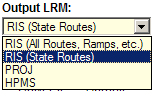
- The user has the ability to perform route and mile readouts in any of the alternate route names (RIS, HPMS, PROJ). These are called the Output LRM on the Highways GIS Portal. Note that RIS is split into two subgroups. RIS (State Routes) is comprised of state routes only and is the default since most information requests are only on state routes. If information is needed on a county route, ramp, frontage road, intermodal connector or other road then RIS (All Routes, Ramps, etc.) should be used.